


Arby’s - Pickup or Delivery
4.626.20K Reviews
App Specs
- Version
- 2026.16.13
- Updated On
- License
- Free
- Downloads
- 5,000,000+
- Developer
- Arby's Restaurant Group, Inc.
- Categories
- Food & Drink
- Platform
- Android, iOS
Screenshots
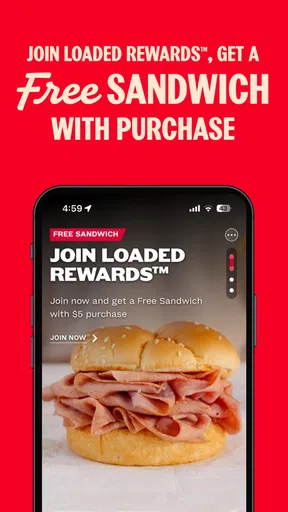
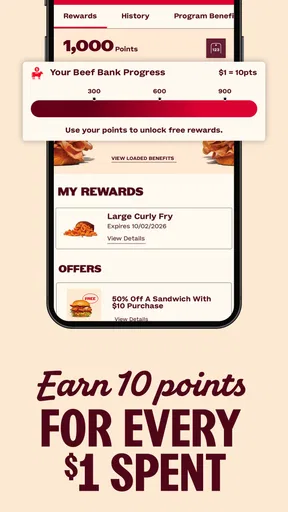
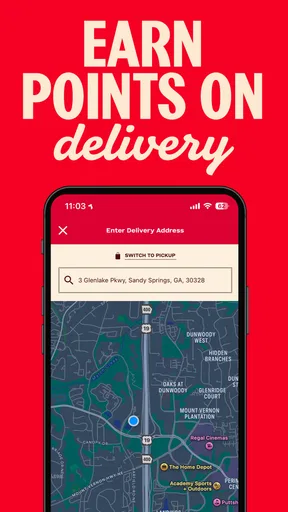
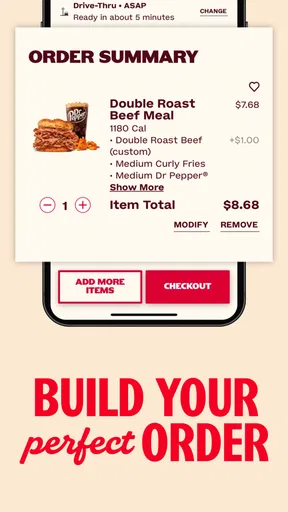
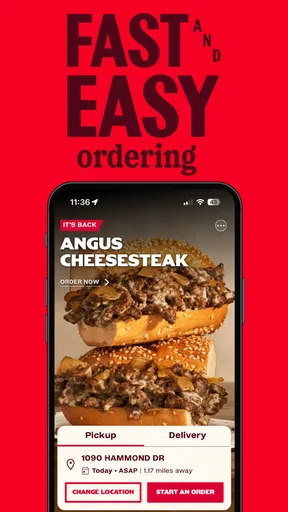
 Analysis by AppCompare
I judge a restaurant app less by the first order than by whether I still have a reason to open it once the novelty wears off. Arby’s Fast Food Sandwiches is most useful when I already know I want food from Arby’s and need to choose a location or arrange pickup or delivery. It is a free Food & Drink app from Arby’s Restaurant Group, Inc., and its central appeal is practical rather than complicated: it brings the chain’s ordering experience onto a phone.
That distinction matters if you are deciding whether it deserves a regular place on your home screen. A dedicated restaurant app can make a familiar order more convenient, but it is not a general meal planner or a way to compare every nearby restaurant. I see it as a shortcut for people who return to Arby’s often enough to value direct ordering, and a less compelling download for someone who only visits occasionally or usually picks whichever place is closest.
Getting Started with the App
First things first, downloading the Arby's Fast Food Sandwiches app is a breeze. It's available on both Android and iOS, so no worries about compatibility here. Once you’ve installed it, the setup is pretty straightforward. You’ll be greeted with a clean interface that’s super easy to navigate, even if you’re not the most tech-savvy person out there.
The app asks for some basic information to tailor the experience to your liking. This includes your location (to find the nearest Arby’s) and any dietary preferences you might have. I found this particularly useful since it means I can quickly check out the menu without having to sift through options I’m not interested in.
In everyday use, the first useful decision is which restaurant to order from, not which sandwich to choose. If you are near more than one location, take a moment to check that the selected restaurant is the one that makes sense for your route. That small pause can save an awkward detour when you are grabbing food between errands or collecting dinner on the way home.
Location access is most helpful when you want the app to identify nearby restaurants; it is not essential to deciding whether a roast beef sandwich sounds good. If you prefer not to share your location, choosing a restaurant manually is the more deliberate approach. I would also check the selected location again before placing an order after traveling, since the nearest restaurant can change as you move around.
Exploring the Menu
The heart of the app is, of course, the menu. And let me tell you, it’s a feast for the eyes. The app showcases Arby’s full range of offerings, from their famous roast beef sandwiches to their curly fries and everything in between. Each item is accompanied by mouth-watering images and detailed descriptions, making it incredibly easy to decide what to order.
Worth Reading Before You Choose

Flipboard Shows What News Apps Must Do Beyond the Feed

Switching to Android Auto Means Rethinking Your Driving Routine

Google Calendar Makes a Crowded Week Easier to Manage

Ludo King Makes the Most of the Minutes Between Plans

Baby Panda World Brings Quick Play to Modern Phones, but Its Game Library Feels Busy

ESPN’s Live Game View Makes Following Close Games Easier
One of the features I particularly enjoyed was the ability to customize my order. Want extra cheese on your Beef ‘n Cheddar? No problem. Prefer your sandwich without onions? Done. The app makes customization a snap, which is perfect for picky eaters like me.
Customization is most valuable when you already know which ingredient you want changed. I would read the item description and check the order summary before confirming, especially when ordering for another person: a quick review is easier than trying to explain a missed modification at pickup. The screen can help communicate a preference, but it is still sensible to mention an important dietary requirement directly to the restaurant rather than treating an app selection as a guarantee about preparation.
For a group order, a useful low-effort workflow is to settle everyone’s choices before opening the checkout process. That keeps the app focused on entering a clear set of items instead of turning a hungry car ride into a long round of back-and-forth. If the group has very different tastes, the dedicated menu is convenient for seeing Arby’s choices together; if everyone is still choosing between several chains, a broader restaurant app may be better for comparing options first.
Ordering Made Easy
Once you’ve made your choice, placing an order is as simple as clicking a button. The app offers several options for receiving your food, whether you want to pick it up in-store, use the drive-thru, or have it delivered straight to your door. I tested all three, and each option worked seamlessly.
What’s more, the app keeps you updated on your order status in real-time. No more wondering how long it’s going to take or if your order got lost in the mix. You get notifications every step of the way, from preparation to pick-up or delivery.
Those choices fit different kinds of days. Pickup makes sense when I am already passing a restaurant and want to collect food without adding a delivery stop; delivery is the more convenient choice when staying home matters more than going out. A drive-thru option can suit a car-based errand, but I would still confirm the selected handoff method in the order before paying so I do not arrive expecting a different pickup routine.
A realistic use case is leaving work with a short window before the evening gets busy. I can browse the menu while deciding whether to stop, choose a familiar sandwich, and arrange pickup at a location that fits the drive home. That is where a restaurant-specific app earns its keep: it makes a known decision easier. If I am not sure what I want, or the goal is simply to find the fastest food nearby, comparing several restaurants may be more useful than starting inside one chain’s app.
Order updates are useful as a prompt to plan the next step, not a reason to arrive too early or assume every handoff detail is identical at every restaurant. I would keep an eye on the selected location and instructions, then follow the pickup details shown for that order. Delivery also changes the trade-off: it saves the trip, while pickup leaves the collection journey in my hands. Which is better depends more on where I am and what I need than on the app itself.
Perks and Rewards
One of the standout features of the app is the rewards program. Every purchase earns you points, which can be redeemed for free items or discounts on future orders. It’s a fantastic way to save a bit of cash while indulging in your favorite meals. Plus, the app often features exclusive deals that you won’t find anywhere else, so it pays to check in regularly.
The app also includes a handy locator that helps you find the nearest Arby’s restaurant, complete with store hours and contact information. I found this particularly helpful during my travels when I needed a quick bite but wasn’t familiar with the area.
Rewards are a reason to check the app again if Arby’s is already part of your routine, but I would not let points dictate what I eat. A deal only has value when it suits the meal I wanted anyway. Before placing an order, it is worth looking at the available offers and the reward balance together; that quick check helps avoid overlooking a relevant option without turning every visit into a hunt for savings.
The locator is particularly practical away from home, when a familiar chain can be easier to find than an independent restaurant. I would use the hours and contact details as a starting point, then verify the location fits my route before committing to a pickup. For a traveler who wants Arby’s specifically, that is a tidy workflow; for someone seeking local recommendations or a wide range of cuisines, a map or restaurant-discovery app is the better tool.
User Experience and Design
As far as user experience goes, the app is a winner. The design is modern and intuitive, with everything laid out logically. The colors are easy on the eyes, and the text is clear and readable. I didn’t experience any lags or crashes, which is always a plus when you’re hungry and in a hurry.
The app also offers a feedback section, allowing you to share your thoughts or report any issues directly. It’s nice to see a company taking user feedback seriously and striving to improve based on customer input.
The ongoing effort required is modest: open the app when you want to order, choose a restaurant, review the menu, and confirm the handoff. Rewards and offers add a reason to return, but they also create one more thing to check. I would keep the app if I order from Arby’s often enough that saved steps and a familiar ordering path matter; if visits are rare, using the app only when needed—or ordering another way—may be simpler than maintaining another account and notification stream.
For Android users, the current version is 8.6.12 and the minimum operating-system requirement is version 11. The app is also available for iOS. That makes device compatibility a sensible thing to check before downloading, particularly if you use an older phone. The content rating is Everyone, so it is presented for a general audience rather than an adults-only one.
Its standing suggests plenty of people find the service useful: it has a 4.6 average from around 268,000 ratings, with over 5 million installs. Those figures are reassuring context, but they do not tell me whether it suits a particular ordering habit. Someone who wants a quick, repeatable way to order Arby’s has a clearer reason to keep it than someone who rarely eats there.
The app’s biggest limitation is also its defining boundary: it is built around one restaurant brand. It can help me choose among Arby’s items and arrange an order, but it is not the right place to weigh Arby’s against a nearby burger shop, a grocery meal, or a different delivery option. I would start with it when the restaurant is already decided; I would start with a general map or delivery service when deciding where to eat is the hard part.
Final Thoughts
All in all, the Arby's Fast Food Sandwiches app is a must-have for any fan of the chain. It’s user-friendly, efficient, and packed with features that make ordering your favorite meals a breeze. Whether you’re a regular or just craving a quick bite, this app has got you covered. So go ahead, give it a whirl, and treat yourself to a delicious Arby’s sandwich today!
My longer-term view is a little more selective: I would recommend it to regular customers who value direct ordering, use the restaurant locator, or are willing to check rewards when they already plan to eat there. The app is free, which makes trying it low-risk, but its lasting value depends on how often Arby’s fits your routine. If you prefer comparing many restaurants in one place, dislike managing separate restaurant apps, or visit the chain only once in a while, it is easy to skip without missing a general-purpose food tool.
For me, the best habit is simple: use the app when I have already chosen Arby’s, confirm the restaurant and handoff method, review any customizations, and treat offers as a bonus rather than a reason to order. That keeps its conveniences useful without making the app another daily obligation. As a focused ordering companion for the chain, it does its job; as a reason to change where or how often I eat, it is not.
Pros
- User-friendly interface and easy navigation.
- Wide variety of menu options available.
- Convenient mobile ordering feature.
- Regular updates with new promotions.
- Loyalty program offers great rewards.
Cons
- Some users report occasional app crashes.
- Limited customization options for orders.
- Notifications can be overly frequent.
- Payment options could be more diverse.
- Not all locations participate in app deals.
FAQs for Arby’s - Pickup or Delivery
What features does the Arby's Fast Food Sandwiches app offer?
The Arby's Fast Food Sandwiches app provides features such as a complete menu overview, nutritional information, and customizable order options. Users can locate nearby Arby’s restaurants, access exclusive deals and promotions, and even place orders for pickup or delivery. Additionally, it offers a rewards program for frequent customers.
Is the Arby's app available for both Android and iOS devices?
Yes, the Arby's Fast Food Sandwiches app is available for download on both Android and iOS platforms. Users can easily find the app on the Google Play Store and the Apple App Store. It is designed to function smoothly across different devices and operating systems.
How does the rewards program in the Arby's app work?
The rewards program in the Arby's app allows users to earn points with every purchase. Once enough points are accumulated, they can be redeemed for free food items or exclusive discounts. The app provides details on current point balances and available rewards, encouraging regular visits and purchases.
Can I customize my order through the Arby's app?
Yes, the Arby's app allows for easy customization of your order. Users can modify ingredients, select preferred sides, and specify any dietary requirements or preferences. The app ensures that your order is prepared exactly to your liking, enhancing the overall dining experience.
What should I do if the Arby's app is not working properly?
If you encounter issues with the Arby's app, first try restarting your device and checking your internet connection. Ensure that the app is updated to the latest version. If problems persist, contact Arby's customer support through the app or their official website for further assistance.


